Disclosure: The links in this post include an affiliate referral code. If you purchase through them, you receive a 10% discount and I receive a small commission at no extra cost to you. Memory-Map had no input into this article.
I've been using Memory-Map for over 12 years. The original HEMA 4WD map application — the one that put digital off-road navigation on the map in Australia — was built on the Memory-Map engine, and I was running it well before the current app existed. I've also tested nearly every other major navigation app available in Australia: HEMA Explorer, ExplorOz Traveller, Gaia, Avenza Maps, Billy Goat, Mud Map 3, Dirt Maps, and more. I made a two-part video series back in 2019 reviewing all six of the main apps, and I've kept testing and comparing since.
The app I run on every trip in 2026 is Memory-Map For All with the HEMA 4WD map pack. After nearly 60,000 kilometres of on- and off-road travel across Australia, I have no reason to change it.
How It Compares to the Alternatives
Before I get into why, here's how Memory-Map For All stacks up against the main alternatives Australian 4WD users consider:
| App | Cost model | Maps | Stability | Offline Australia |
|---|---|---|---|---|
| Memory-Map For All | Free app + one-off map purchase | HEMA 4WD + 25k topo | Excellent — zero crashes in 60,000 km | Full download ✓ |
| ExplorOz Traveller | Subscription | ExplorOz vector maps | Buggy — frequent track log failures | Full download ✓ |
| HEMA Explorer | Subscription per map set (per year) | HEMA Explorer maps | Cloud issues, buggy | Full download ✓ |
| Gaia GPS | Annual subscription | Premium topo | Good | Tile-by-tile only |
| Avenza Maps | Per-map purchase | Varies by map | Good | Hundreds of tiles per state |
| Mud Map 3 | One-off | Mud Map | Development stalled, crashes | Full download ✓ |
Memory-Map For All is the only option that combines a free app, a one-off map purchase with no ongoing subscription, full Australia-wide offline capability, and a stability record that has held up under years of remote touring.
The ExplorOz Detour
I had a stint with ExplorOz Traveller. There were things I liked about it — the track database is useful, and I recommended it at the time. But the bugs started compounding. Track logs recording as phantom lines. The app freezing after a software update in the middle of a trip with no reception. Waypoints I couldn't create. A search window that wouldn't dismiss no matter how many times I tapped it.
These weren't one-off issues — they were recurring, and they happened in remote areas where I was depending on the app. When something breaks 500 kilometres from the nearest town, a promised software update doesn't help you. I never fully stopped using Memory-Map during that period, and it didn't take long to come back to it as my primary app.
In early 2026, out in the Brindabella Ranges west of Canberra, ExplorOz had its maps disappear again after the iPad screen slept. Memory-Map was back immediately when the screen came on. Same story as before.
The HEMA 4WD Map Pack — Buy It Now While It's Still a One-Off Purchase
Memory-Map For All is a free download. To make it useful for remote Australian travel, you need the HEMA 4WD map pack. It includes the full suite of HEMA 4WD raster maps, regional desert maps, and broader 4WD coverage. It is a one-time purchase — you buy it once and own it permanently. I'm still running licences I purchased years ago.
This matters more than most people realise. A number of competing apps have moved to annual subscription models — pay per map set, per year. If you have multiple map sets across different states, that can easily reach $200 or more per year, for maps covering remote Australian terrain that doesn't change anywhere near that often.
There is a real possibility HEMA will move the HEMA map pack to a subscription model. If that happens, the option to buy it outright disappears. If you've been considering it, now is the right time to lock it in as a permanent purchase.
Use the link below for a 10% discount — applied automatically at checkout:
→ Buy the HEMA 4WD Map Pack — 10% off
For close-up detail in technical terrain, the 25k state topo maps are an additional purchase. I have them for every state and use them regularly.
→ Buy VIC Topo Maps 2025 (1:100k, 1:50k, 1:25k) — 10% off
Features That Make a Real Difference in the Field
I was a consultant on the Memory-Map For All development in 2022 — many of the features in the current version came from my direct feedback. So I have a bias worth knowing about. But the app has never paid me for content, and two years later I'm using it on every trip because it works, not out of loyalty.
The standout feature is multiple simultaneous map screens. I run two iPads in the car — one zoomed out on a big-scale overview of the terrain ahead, one zoomed in tight on the current track. Each screen can show a completely different map at a completely different location. You can have the Simpson Desert open on one page and the Victorian High Country on another without disrupting your current navigation setup.
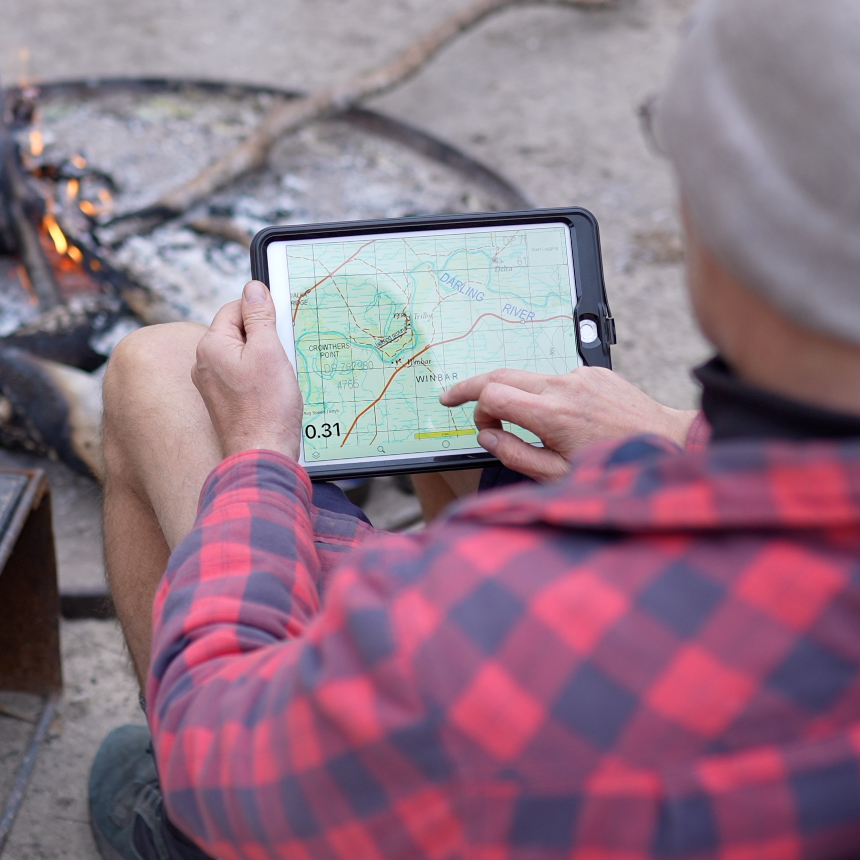
The velocity vector is something I use constantly — an arrow projected from your GPS position showing where you'll be in a set time at your current speed. I run it at five minutes in technical country, 30 minutes on open outback tracks. Paired with range rings at five-kilometre increments, it gives a practical, instant read on distance to the next turn or campsite.
Track logging has been faultless. Across nearly four years and close to 60,000 kilometres, I have not had a single crash, a failed log, or a lost recording. That record covers the Simpson Desert, Fraser Island, the Victorian High Country, the Flinders Ranges, the NSW tablelands, and everything in between.
The companion desktop app for Mac and PC runs the same map data — useful for pre-trip planning on a large screen.
Feature comparison at a glance
| Feature | Memory-Map For All | ExplorOz Traveller | HEMA Explorer |
|---|---|---|---|
| Multiple simultaneous map screens | ✓ | ✗ | ✗ |
| Velocity vector | ✓ | ✗ | ✗ |
| Range rings | ✓ | ✓ | ✗ |
| Desktop companion app | ✓ | ✗ | ✗ |
| Track database | Limited | Extensive | Limited |
| POI/campsite database | Weak | Good | Good |
| Offline without tile-by-tile setup | ✓ | ✓ | ✓ |
The One Weakness
The point of interest database is the biggest gap and has been from the start. Memory-Map doesn't find many smaller locations — unnamed tracks, remote campsites, obscure reference points.
My fix: WikiCamps on the same iPads. It has the best campsite and POI database in Australia — user-reviewed, extensive, updated regularly. Memory-Map handles navigation and maps. WikiCamps handles campsites and points of interest. I also keep ExplorOz Traveller on the device as a third reference for its track database, though it hasn't been my primary app for years.
How to Get Started
- Download Memory-Map For All free from the App Store (iOS) or Google Play (Android). A Mac and PC version is also available — search the Memory-Map website under "Installation."
- Create a Memory-Map account on the Memory-Map website.
- Purchase the HEMA 4WD map pack using the discount link below — it's tied to your account, not the device.
- Log into the app with your account credentials.
- Go to Maps → My Online Maps → HEMA 4WD Pack → download all maps for offline use before you leave home. My HEMA maps alone take nearly 40GB — do this on Wi-Fi.
No subscription, no recurring cost. Download, buy once, go.
Get the 10% Discount
These links apply a 10% discount at checkout and generate a small commission for the channel.
HEMA 4WD Map Pack — 10% off → Buy now
VIC Topo Maps 2025 (1:100k, 1:50k and 1:25k) — 10% off → Buy now
To browse the full Memory-Map map store: → memory-map.com
The video above covers two years and 60,000 km of real-world use in detail — settings, in-car setup, track log management, and tips. For everything else off-road, the AllOffRoad YouTube channel has 490+ videos across 14 years of touring.